Word Processing: Writing Stories
A Word Processor is software used for creating documents that are mostly text. You can use it to write a letter, a story, or a school report.
What can you do?
In a word processor, you don’t just type words. You can make your writing look professional and fun!
1. Change the Look (Formatting)
You can change how your text looks to make it stand out:
- Font: Change the style of the letters. Some look formal, while others look like handwriting!
- Size: Make your title big and your story text smaller.
- Color: Use different colors for your headings.
- Bold, Italic, and Underline: Use Bold for important words, Italics for book titles, and Underline for headings.
2. Organize your Page (Alignment)
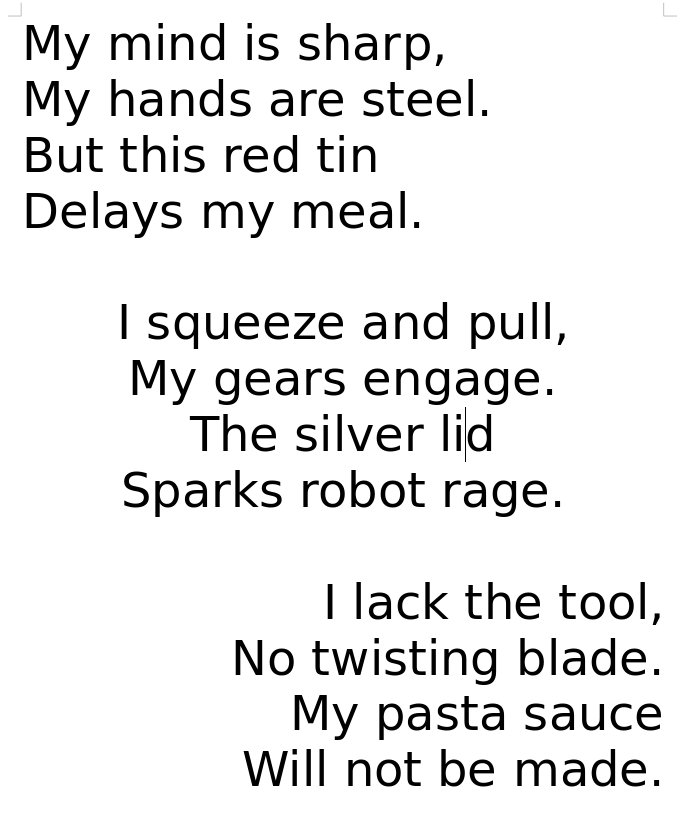
You can decide where the text sits on the page:
- Left Align: The lines of text all line up on the left side (this is how we usually write).
- Center: The text is right in the middle (great for titles!).
- Right Align: The lines of text all line up on the right side.
3. Add Lists
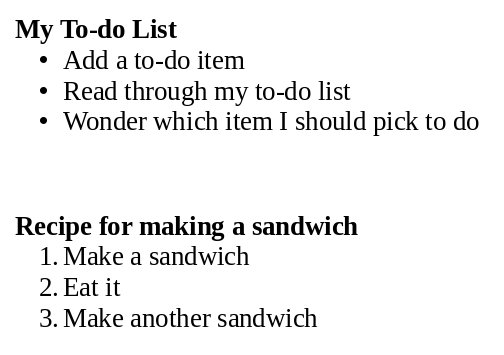
If you are writing a shopping list or steps for a recipe, you can use:
- Bulleted Lists: Like the ones you see here!
- Numbered Lists: 1, 2, 3… to show the order of things.
4. Pictures and Spelling
- Add Pictures: Put photos or drawings into your document to help tell your story.
- Check Spelling: The software helps you find words you spelled wrong by putting a red squiggly line under them.
Examples of Word Processors
- Microsoft Word: The most famous one, used by many people at work and school.
- Google Docs: A free one that works inside your web browser! You can even work on the same document with a friend at the same time.
- LibreOffice Writer: A free word processor for Linux and Windows.
- Pages: A beautiful word processor for Mac and iPad.
Did you know?
- Before computers, people used Typewriters. If you made a mistake, you had to use special white paint (called “Wite-Out”) or start the whole page all over again!
- The first word processors weren’t software on a computer; they were huge, heavy machines that could only do one thing: type and edit text.
- The “Copy and Paste” feature was invented by a man named Larry Tesler. He wanted to make it easier for people to move text around without retyping it.
Questions
- If you wanted to write a book report, what kind of software would you use?
- You are writing a title for your story. Which alignment would make it look best in the middle of the page?
- What is the feature called that helps you if you spell a word incorrectly, and what does it usually look like on the screen?
- Why would you use a Numbered List instead of a Bulleted List?
- Name one word processor that you can use for free on the internet.