Spreadsheets: Organizing Numbers
Have you ever seen a big table full of numbers and wondered how people keep track of them all? That’s where spreadsheets come in!
A spreadsheet is a piece of software that helps you organize information in rows and columns. It’s like a giant piece of digital graph paper that can also do math for you.
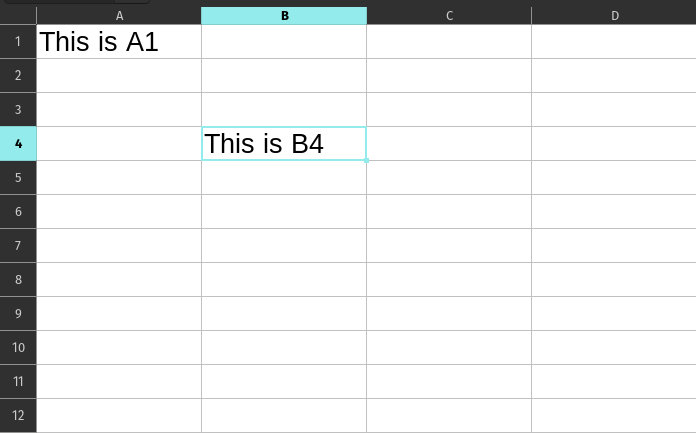
Rows, Columns, and Cells
The layout of a spreadsheet is very organized:
- Columns go up and down and are always named with letters (A, B, C…).
- Rows go across from left to right and are always named with numbers (1, 2, 3…).
- A Cell is the little box where a row and a column meet.
We give each cell a “name” based on its column letter and row number, like A1 or C5. Think of it like a secret code or a map to find where a piece of information is hidden!
Why use Spreadsheets?
Spreadsheets are amazing because they can do math for you instantly! If you have a list of prices for your birthday party, you can tell the spreadsheet to add them all up. If you change the price of the cake, the spreadsheet automatically recalculates the total without you having to do anything!
People use spreadsheets for:
- Budgets: Keeping track of pocket money or how much a party costs.
- Schedules: Making a school timetable or a sports practice schedule.
- Inventories: Listing all your favorite toys or books.
- Charts: Turning boring lists of numbers into colorful pictures.
Formatting: Making it Look Good!
Just like a word processor, you can change how your spreadsheet looks. You can:
- Make text Bold or change its color to make headers stand out.
- Fill Cells with Color to group different types of information together.
- Add Borders to make the grid lines easier to see.
- Change Column Width if your words are too long to fit in the box!
Formulas: The Magic of Spreadsheets
To make a spreadsheet do math, you use something called a formula. A formula always starts with an equals sign (=).
For example, if you want to add the numbers in cell A1 and A2, you would type:
=A1+A2
Spreadsheets also have built-in “super-powers” called Functions. Instead of adding every single cell one-by-one, you can use =SUM(A1:A10) to add everything from cell A1 all the way down to A10 in one go!
Amazing Charts
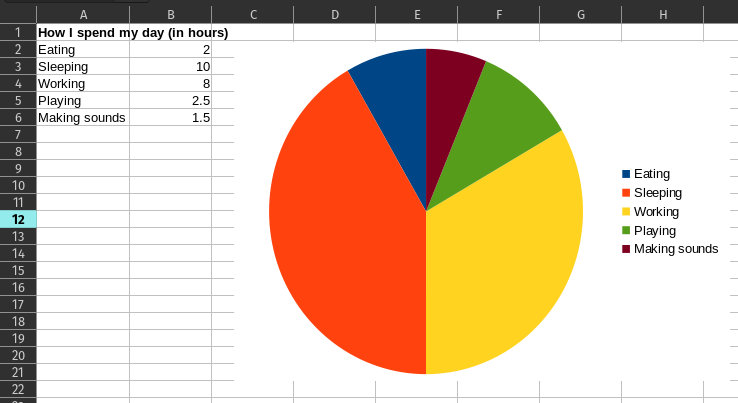
Sometimes, looking at a long list of numbers is boring. Spreadsheets can take those numbers and turn them into Charts and Graphs.
- Pie Charts show how a whole thing is split into parts (like how you spend your day).
- Bar Charts are great for comparing different things (like which fruit is the most popular in your class).
Did you know?
- The First Spreadsheet: The very first spreadsheet program was called VisiCalc, and it was invented in 1979. Before that, people had to do all these calculations by hand on big sheets of paper!
- Huge Tables: A single spreadsheet can have over 1,000,000 rows! That’s a lot of space for information.
- Auto-Fill: If you type “Monday” in one cell and “Tuesday” in the next, most spreadsheets can automatically fill in the rest of the week for you if you click and drag the corner of the cell!
Questions
- What do we call the little box where a row and a column meet?
- If you are looking at the third column (C) and the fifth row (5), what is the name of that cell?
- What symbol must every formula start with in a spreadsheet?
- Why is it better to use a spreadsheet for a budget instead of just writing it on paper?
- What is the difference between a Bar Chart and a Pie Chart?
- If you have a list of 50 numbers to add up, what is the name of the function you could use to do it quickly?