How Computers Talk (Digital Data)
Have you ever wondered how a computer remembers your favorite picture or the high score in your game? It doesn’t use words or colors like we do. Instead, computers use something much simpler: Numbers!
The Language of On and Off
Inside a computer, everything is made of billions of tiny electronic switches called transistors. These switches are like the light switches in your house, but much, much smaller. They can only be in two states:
- ON (Represented by the number 1)
- OFF (Represented by the number 0)
Because there are only two choices (0 or 1), we call this system Binary. The word “bi” means two, just like a bicycle has two wheels!
Bits and Bytes
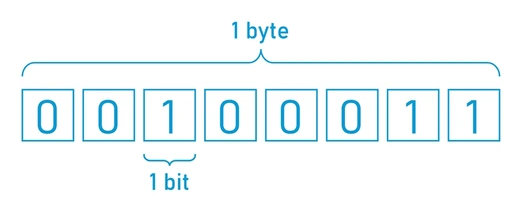
- Bit: A single 1 or 0 is called a “bit.” It is the smallest piece of information a computer can understand.
- Byte: When you put 8 bits together in a row, it’s called a “byte.”
Think of it like LEGO bricks. One tiny bit is like a single stud. When you snap 8 of them together, you have a bigger brick (a byte) that can start to represent something useful.
Example:
- 1 bit: Can tell you if a light is ON or OFF.
- 1 byte: Can represent a single letter, like ‘A’ or ‘B’.
Everything is a Number
Even though computers only see 1s and 0s, they can combine them to represent everything else:
- Letters: There is a special “codebook” (like ASCII or Unicode) that tells the computer which byte represents which letter. For example, the code
01000001is the letter A. - Colors: Computers create colors by mixing Red, Green, and Blue light. Each color gets its own number. A bright red might be
255in decimal, which looks like11111111in binary! - Pictures: A photo is just thousands of tiny dots called pixels. Each pixel has its own binary code that tells the computer exactly what color it should be.
Letter Codes (a-z)
Here is how a computer sees the lowercase letters of the alphabet:
| Letter | Decimal | Binary |
|---|---|---|
| a | 97 | 01100001 |
| b | 98 | 01100010 |
| c | 99 | 01100011 |
| d | 100 | 01100100 |
| e | 101 | 01100101 |
| f | 102 | 01100110 |
| g | 103 | 01100111 |
| h | 104 | 01101000 |
| i | 105 | 01101001 |
| j | 106 | 01101010 |
| k | 107 | 01101011 |
| l | 108 | 01101100 |
| m | 109 | 01101101 |
| n | 110 | 01101110 |
| o | 111 | 01101111 |
| p | 112 | 01110000 |
| q | 113 | 01110001 |
| r | 114 | 01110010 |
| s | 115 | 01110011 |
| t | 116 | 01110100 |
| u | 117 | 01110101 |
| v | 118 | 01110110 |
| w | 119 | 01110111 |
| x | 120 | 01111000 |
| y | 121 | 01111001 |
| z | 122 | 01111010 |
Counting Like a Computer
We usually count using ten digits (0, 1, 2, 3, 4, 5, 6, 7, 8, 9). This is called Decimal. But since computers only have two “fingers” (0 and 1), they count differently.
Imagine you have three light bulbs.
- If all are off (
000), that’s 0. - If the first one is on (
001), that’s 1. - If the second one is on (
010), that’s 2. - If the first and second are on (
011), that’s 3.
By using enough bits, a computer can count as high as it needs to!
Did you know?
- The first “Bit”: The word “bit” stands for Binary Digit. It was first used by a scientist named Claude Shannon in 1948.
- Binary is Old: Even though computers are modern, the idea of binary was developed by a mathematician named Gottfried Wilhelm Leibniz way back in 1689!
- Punch Cards: Long ago, before screens and keyboards, people “talked” to computers by punching holes in paper cards. A hole meant “1” and no hole meant “0”.
Check Your Knowledge
- Why do computers use Binary (0s and 1s) instead of human words?
- If you have 8 bits, what is that group called?
- What is a “pixel,” and how does a computer know what color it should be?
- How many different patterns can you make with just 2 bits? (Try writing them down!)